
Amanda
VerifiedE-commerce Store
“It helped me understand why my website wasn't showing up well in AI answers. The suggestions made sense, even for someone without technical knowledge. 🥰”
If the AI bots that power ChatGPT, Perplexity, and Claude cannot crawl your website, your content will never appear in their answers. Let me tell you, It does not matter how good the content is. One small line in your robots.txt file can make you invisible to every AI platform at once.
This free checker reads your live robots.txt file, then tells you exactly which AI crawlers can access your site and which ones are blocked.
Whenever you have a question for AI, and it extracts the related data by analyzing various websites, some have already been accessed, and some they can access in real time. So, it's in your best interest to have your content blocked to maximize its visibility for crawlers, in regard to quality, rankings, and relevance.
How to instruct crawlers is under the robots.txt file on your homepage. Most of the time, it happens by coincidence. There are too many vague and too wide-ranging and late-implemented instructions for too many other bots, default-triggered security plugins, and CDNs. You'd never know it's there if you never looked.
We read your robots.txt and evaluate it against detailed scripts for 14 AI crawlers. The result shows exactly which bots are given access, which bots are blocked, and which are indirectly and loosely blocked.
Not sure what your robots.txt file contains? Check it instantly at yourdomain.com/robots.txt in any browser, then run it through our checker to see how each AI crawler reads those rules.
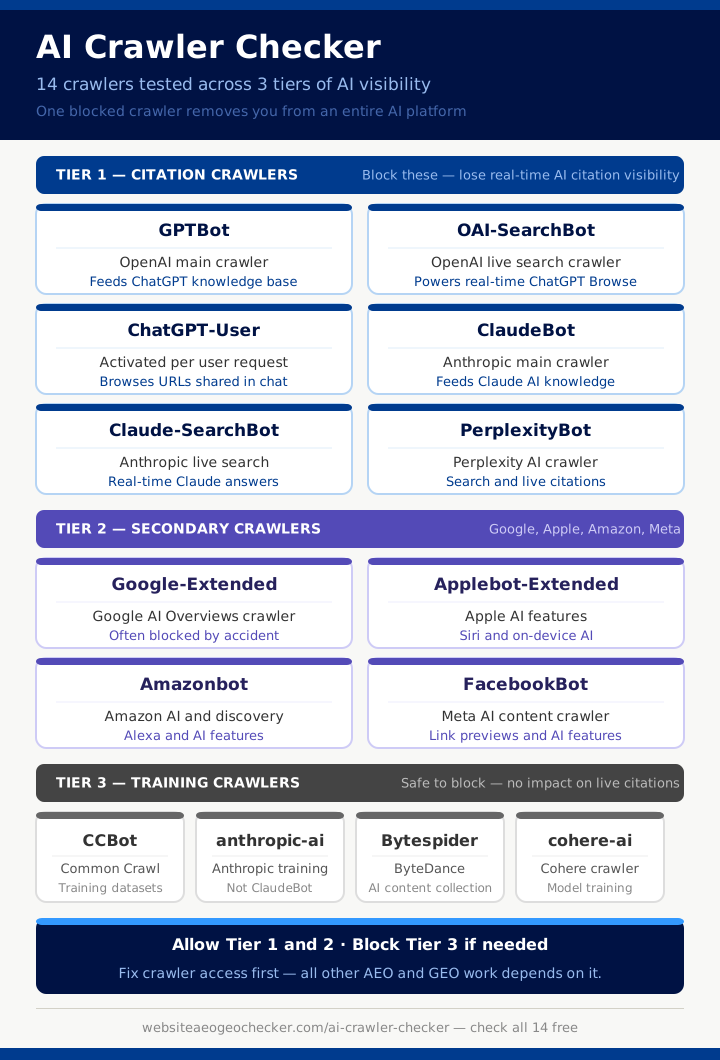
We test three tiers of AI crawler. Each tier has a different level of impact on your AI visibility.
These are the most important crawlers for AI visibility. They directly support real-time answers and citations in the platforms people use every day.
GPTBot - It is OpenAI's main crawler. Used to build ChatGPT's knowledge base and feed its responses. Blocking this bot can remove you from ChatGPT entirely.
PerplexityBot - Perplexity AI's crawler for search, citations and real-time answers. One of the most active AI citation crawlers in 2026.
OAI-SearchBot - It is OpenAI's live search crawler. This bot powers real-time ChatGPT Browse answers. Separate from GPTBot and needs its own allow rule.
ChatGPT-User - Activated when a ChatGPT user asks the system to browse a specific URL. Blocking this stops ChatGPT from reading pages you directly share.
ClaudeBot - It is Anthropic's main crawler for Claude AI. Blocking this removes you from Claude's knowledge.
Claude-SearchBot - It is Anthropic's live search crawler for real-time Claude answers.
These crawlers matter for visibility on major platforms including Google, Apple, Amazon, and Meta products.
Google-Extended - It is Google's AI crawler used for AI Overviews and AI-related processing. Blocking this removes you from Google AI Overviews. Many sites block it without realising.
Applebot-Extended - Apple's extended crawler for AI and assistant features across Apple devices.
Amazonbot - It is Amazon's crawler. It supports AI discovery and product features.
FacebookBot - Meta's crawler that affects AI-related content understanding and link previews across Meta platforms.
These crawlers collect training data for model development. Blocking them is common and acceptable for most websites. It does not affect your real-time citation visibility.
CCBot - It is a Common Crawl's bot, used in many open training datasets.
anthropic-ai - Anthropic's training-focused crawler, separate from ClaudeBot.
Bytespider - ByteDance's crawler associated with AI and content collection.
cohere-ai - It is Cohere's crawler for model training data collection.
Your robots.txt file at yourdomain.com/robots.txt controls which crawlers can access your site and which paths they can read.
Each bot appears under a User-agent: line followed by allow or disallow rules. Here is what the most common patterns mean:
If a bot is not mentioned at all: allowed by default.
Blocks every crawler on the web (including all AI bots). This is the most common accidental block:
User-agent: *
Disallow: /
Blocks only OpenAI's main crawler while leaving others unaffected:
User-agent: GPTBot
Disallow: /
Explicitly allows GPTBot to crawl everything:
User-agent: GPTBot
Allow: /
Our checker reads these rules. Follows the exact matching logic each crawler uses, and gives you the precise status of all 14 supported crawlers. It also flags indirect blocks, where a wildcard rule is blocking a bot that was never specifically named.
The fix is almost always a simple edit to your robots.txt file.
Remove the Disallow rule for any AI crawler you want to allow. Or add an explicit Allow: / rule under that bot's User-agent line. After updating the file, run the checker again to confirm the change is live.
If you want more control, you can allow Tier 1 citation crawlers while keeping Tier 3 training crawlers blocked. That gives you full citation visibility, without opening your content to training data collection.
Our report shows exactly which bot is blocked and where the rule sits in your file, so you can make a targeted change t your website, rather than editing blindly.
All Tier 1 crawlers allowed: It means, Your site is fully visible to ChatGPT, Claude, and Perplexity for both real-time and trained answers. So, No action needed on crawler access.
One or more Tier 1 crawlers blocked: Your content is invisible to those platforms. Fix the block first before any other AEO or GEO work.
Google-Extended blocked: It means, You are excluded from Google AI Overviews regardless of your Google rankings. This is one of the most common & most overlooked blocks we find.
All crawlers blocked by wildcard: A single Disallow: / under User-agent: * is shutting out every AI platform at once. This is the highest-priority fix on the entire site.
No account needed. No payment required. Enter your URL and see which crawlers are allowed or blocked in seconds.
Want to understand what comes after fixing crawler access? Read our guide on why sites are missing from ChatGPT answers, check your full AI readiness with our AEO Checker, or browse all tools at the Tools Directory.
Many sites block AI crawlers in robots.txt to control training access, reduce server load, or protect paid content. Some hosting providers also add restrictive defaults without the owner realizing. Blocking can be intentional, but it can also accidentally prevent your content from being cited.
GPTBot is commonly associated with model training and large-scale crawling. OAI-SearchBot is used for live search and retrieval, where ChatGPT looks up pages to cite in real time. Allowing one does not automatically allow the other, so both should be checked.
It depends on your goals. Some websites choose to block training crawlers like CCBot to limit dataset scraping, and that can be a reasonable choice. However, blocking too broadly with wildcard rules may also block citation-focused crawlers that you actually want.
You can allow GPTBot by ensuring there is no rule that disallows it, and by avoiding a wildcard disallow for all crawlers. A safe approach is to create a specific group for GPTBot and allow the paths you want it to access. After changes, re-run the checker to confirm access.
No. Allowing crawlers is necessary for visibility, but it is not a guarantee of citations. AI engines still choose sources based on relevance, authority, and content quality, and results can vary by query and time.
Real feedback from website owners and digital marketing specialists using our AI search tools.
E-commerce Store
“It helped me understand why my website wasn't showing up well in AI answers. The suggestions made sense, even for someone without technical knowledge. 🥰”
Full Stack Developer
“Practical and focused. Does one thing really well — tells you if AI crawlers can access your content and what might be blocking them.”
Digital Strategist
“Understanding AI crawler access is the foundation of AI SEO. This tool makes that analysis quick and straightforward.”
Site Reliability Engineer
“Great tool for ensuring our infrastructure doesn't accidentally block AI crawlers. The detailed report shows exactly which bots are affected and why.”
SEO Specialist
“I run this check on every new client's site as part of the technical audit. It catches AI crawler blocks that other tools completely miss.”
Web Developer
“Simple but powerful. It checks exactly which AI crawlers can reach your site and highlights any blockers. Saved us hours of manual log analysis.”
DevOps Lead
“Essential tool for verifying that AI search bots can access your content. The crawler-by-crawler breakdown is incredibly helpful for debugging access issues.”
Technical SEO Manager
“The AI Crawler Checker revealed that several major AI crawlers were being blocked by our robots.txt. Fixed it immediately and saw improvements within weeks.”
E-commerce Store
“It helped me understand why my website wasn't showing up well in AI answers. The suggestions made sense, even for someone without technical knowledge. 🥰”
Full Stack Developer
“Practical and focused. Does one thing really well — tells you if AI crawlers can access your content and what might be blocking them.”
Digital Strategist
“Understanding AI crawler access is the foundation of AI SEO. This tool makes that analysis quick and straightforward.”
Site Reliability Engineer
“Great tool for ensuring our infrastructure doesn't accidentally block AI crawlers. The detailed report shows exactly which bots are affected and why.”
SEO Specialist
“I run this check on every new client's site as part of the technical audit. It catches AI crawler blocks that other tools completely miss.”
Web Developer
“Simple but powerful. It checks exactly which AI crawlers can reach your site and highlights any blockers. Saved us hours of manual log analysis.”
DevOps Lead
“Essential tool for verifying that AI search bots can access your content. The crawler-by-crawler breakdown is incredibly helpful for debugging access issues.”
Technical SEO Manager
“The AI Crawler Checker revealed that several major AI crawlers were being blocked by our robots.txt. Fixed it immediately and saw improvements within weeks.”
Your review helps website owners and SEO creators optimize their sites for ChatGPT, Gemini, and AI search engines.