
Greg Walker
VerifiedPlatform Engineer
“Clean, fast, and accurate. The checker gives clear pass/fail results with actionable suggestions for improvement.”
When an AI crawler visits your website, it has to figure out what your site is about by reading page after page. An llms.txt file changes that. It gives AI systems a clear, structured overview of your site before they start crawling, what you do, which pages matter most, and how your content is organized.
Most websites do not have one yet. This free checker tells you instantly whether your site does, shows you the content, and checks for all three file variants alongside the separate ai.txt file.
llms.txt is a plain text file placed at the root of your domain that helps AI language models understand your website faster and more accurately.
Like robots.txt, it provides direction to crawlers. However, llms.txt provides context rather than setting boundaries. It informs AI about your site's purpose, key pages, and content organization, saving crawlers from having to analyze your content page by page.
Having access to llms.txt provides AI crawlers with the overall site context to help them decide which links to follow, and to help them understand the content and context more accurately. It is incredibly easy to set up and almost free to maintain.
Having llms.txt on your page allows the focus and context of AI tools to shift away from content creation and more toward page discovery, summarization, and citation.
llms.txt A short, focused summary of your site with key page links and descriptions. This is the best starting point for most websites. It is often under 50 lines. Start here.
llms-full.txt A more detailed version that can include longer summaries or the full text of important pages. Useful when you want AI tools to understand more of your site without crawling every page individually. Best for large sites or sites with long, detailed articles.
llms-small.txt A compact version for AI tools that work with smaller context windows. It gives a very short overview & highlights only the most important pages. Use this alongside llms.txt if you want to cover AI systems with tighter input limits.
Most websites only need the main llms.txt file to start. The other two are optional & become useful as your site grows or as you want more precise control over how AI systems read your content.
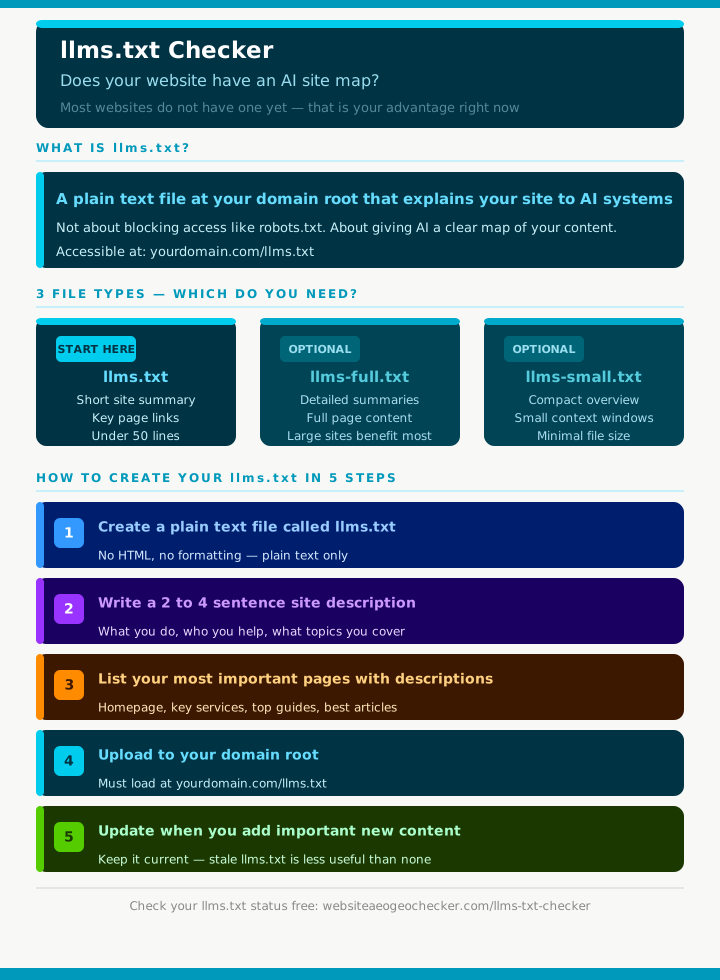
Creating an llms.txt file takes under 30 minutes for most sites.
Step 1: Open a plain text editor and create a new file called llms.txt.
Step 2: Write a short description of your site in plain English. Two to four sentences explaining what you do, who you help, and what topics you cover.
Step 3: List your most important pages with a brief description of each. Include your homepage, key service or product pages, your best guides, and your most-visited blog posts.
Step 4: Place the file at your domain root so it is accessible at yourdomain.com/llms.txt.
Step 5: Update it when you add important new pages, change major URLs, or significantly update core content.
Keep the writing simple. No HTML, no design elements, no complicated formatting. The file works best when it reads like a clean, human readable directory of your most useful pages. If a person can quickly understand it, an AI tool can use it.
A basic llms.txt file for a service business might look like this:
# Website AEO GEO Checker
Free tool that checks websites for AEO, GEO, and AI search readiness.
We run 50+ tests across crawlability, structured data, content quality, and page speed.
Built for small businesses, bloggers, SEO professionals, and agencies.

## Key pages
- Homepage: https://websiteaeogeochecker.com/
  What we do and how to run a free check.
- AEO Checker: https://websiteaeogeochecker.com/aeo-checker
  Tests 9 signals that determine answer engine optimization score.
- GEO Checker: https://websiteaeogeochecker.com/geo-checker
  Tests 9 signals that determine generative engine optimization score.
- Complete AEO Guide: https://websiteaeogeochecker.com/guides/complete-aeo-guide
  Full guide to optimising content for AI answer engines.
That is it. Clear, structured & immediately useful to any AI system that reads it.
llms.txt is still an emerging standard. Not every AI crawler checks for it yet and major AI labs have not all publicly committed to using it in the same way.
It is incredibly easy to set up and almost free to maintain. As these tools mature, it is a low-risk, easy, and structural improvement to your site. It is very important to be a site that adopts clear AI-facing documentation first.
Simply posting llms.txt does not mean you will be cited. Llms.txt helps crawlers see your site as well-organized and not a random cluster of info. In that sense, it is worth the time.
Our checker also looks for llms-full.txt, llms-small.txt, and the separate .well-known/ai.txt file so you can see your full AI file coverage in one place.
For a complete guide to what llms.txt should contain and how to format it correctly, read our full llms.txt guide. To see how llms.txt fits into your broader AI visibility strategy, read our Complete GEO Guide.
No account needed. No payment required. Enter your URL and see your llms.txt status in seconds. Try Our Website AEO GEO checker
llms.txt is a plain text file that provides AI systems a curated map of your best content. It typically lists key URLs and short descriptions. The goal is to make it easy for models and agents to retrieve the right pages to cite.
llms.txt is usually a short, human-readable index. llms-full.txt can include more pages and more detailed descriptions. llms-small.txt is a compact version intended for quick retrieval when bandwidth or context is limited.
Start by listing your most important pages and writing one sentence describing what each page answers. Keep it clear, factual, and specific. Host the file at the root of your domain and keep it updated as your site changes.
Some AI systems and tools are beginning to support llms.txt as an emerging convention. Adoption is not universal, but it is a low-effort way to provide explicit guidance. Even when not used directly, it helps you clarify and structure your content inventory.
Place it at https://yourdomain.com/llms.txt so it is easy to discover. If you also publish variants, host them at the root as well, such as /llms-full.txt and /llms-small.txt. Make sure they are plain text and publicly accessible.
Real feedback from website owners and digital marketing specialists using our AI search tools.
Platform Engineer
“Clean, fast, and accurate. The checker gives clear pass/fail results with actionable suggestions for improvement.”
Developer Advocate
“The most thorough llms.txt validation tool available. Goes beyond basic syntax checking to evaluate the quality and completeness of your content.”
CTO
“We implemented llms.txt across all our properties and used this checker to verify each one. Caught inconsistencies we would have shipped to production.”
SEO Analyst
“Great for verifying that your llms.txt file follows the specification correctly. Helped us fix several issues with our implementation.”
Web Standards Advocate
“Finally, a tool that validates llms.txt files properly. The detailed feedback about formatting and content structure is extremely helpful.”
Content Ops Manager
“As the llms.txt standard gains adoption, this tool is crucial. It verifies your implementation is correct and suggests improvements.”
Technical SEO Lead
“The LLMs.txt Checker validated our implementation and caught formatting errors we would have missed. Essential for anyone implementing the llms.txt standard.”
Platform Engineer
“Clean, fast, and accurate. The checker gives clear pass/fail results with actionable suggestions for improvement.”
Developer Advocate
“The most thorough llms.txt validation tool available. Goes beyond basic syntax checking to evaluate the quality and completeness of your content.”
CTO
“We implemented llms.txt across all our properties and used this checker to verify each one. Caught inconsistencies we would have shipped to production.”
SEO Analyst
“Great for verifying that your llms.txt file follows the specification correctly. Helped us fix several issues with our implementation.”
Web Standards Advocate
“Finally, a tool that validates llms.txt files properly. The detailed feedback about formatting and content structure is extremely helpful.”
Content Ops Manager
“As the llms.txt standard gains adoption, this tool is crucial. It verifies your implementation is correct and suggests improvements.”
Technical SEO Lead
“The LLMs.txt Checker validated our implementation and caught formatting errors we would have missed. Essential for anyone implementing the llms.txt standard.”
Your review helps website owners and SEO creators optimize their sites for ChatGPT, Gemini, and AI search engines.