If you've ever wondered why your competitors with more concise web pages appear in ChatGPT responses but yours doesn't, schema markup could be a contributing factor. It likely isn't the quality of the writing or the volume of the backlinks. It could be the presence of structured data in a competitor's web page code that visually tells AI what data it is processing and what content it is.
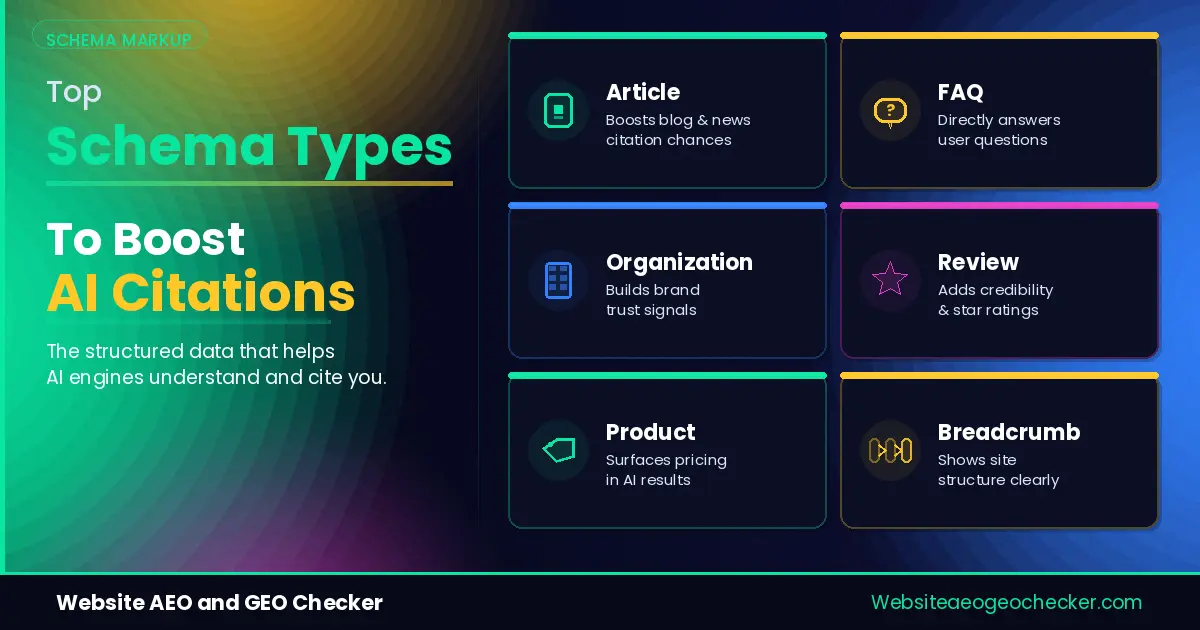
This document describes eight schema types that regularly appear on web pages cited by AI models. It includes working examples of each schema type in the JSON-LD format. You are free to copy and modify any of the examples provided here.
Why Schema Markup Matters for AI Citations
AI Systems have a very different reading comprehension capability than that of humans. AI Systems and models read in a very compartmentalized manner. They often have to identify and classify content within a very short time frame. It is very important for AI Systems to have a lot of explicit data signals to work with. A human reader has a lot more leeway when it comes to the layout and design of a page.
Schema markup written in JSON-LD format is the clearest explicit signal you can give. It tells a model directly: this is an article, written by this named person, published on this date, answering this specific question. Without it, a model has to guess, and guessing means it is more likely to skip your page in favor of one that removed the guesswork. You can check how your site currently scores on this using the Free GEO Checker, which evaluates structured data alongside crawlability and content structure in a single pass.
Across the audits we have run, pages with at least three of the eight schema types below get referenced in AI answers roughly twice as often as pages with none, even when the underlying content quality is similar. - Website AEO GEO Checker.
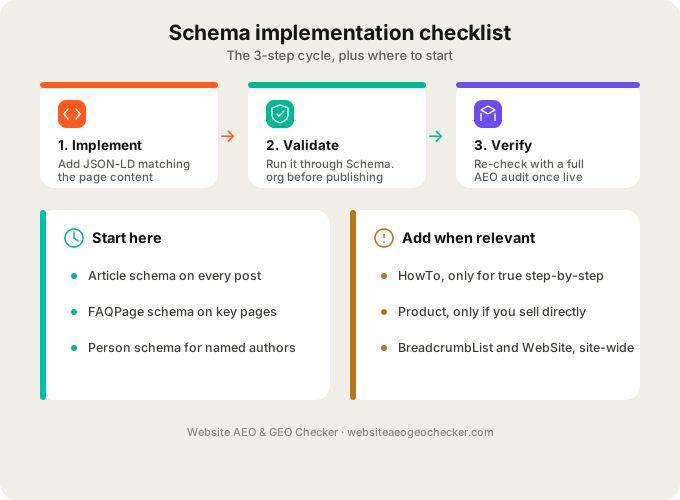
How to Add JSON-LD to Your Site
Google and most other AI Systems recommend JSON-LD (JavaScript Object Notation for Linked Data) for the markup of structured data. JSON-LD is embedded in a script tag in your web page's HTML. It is usually placed in the head section of a web page and goes completely unnoticed by human visitors.
A basic JSON-LD block looks like this:
<script type="application/ld+json">
{
  "@context": "https://schema.org",
  "@type": "Article",
  "headline": "Your page title here"
}
</script>
You can add this manually if you control your site's HTML directly, through a plugin if you run WordPress or a similar CMS, or through your site's template system if you work with a developer. The official JSON-LD specification covers the full technical detail if you want to go deeper than this guide, though the examples below should cover what most sites need.
For the full list of available schema types beyond the eight covered here, schema.org's official documentation maintains the complete vocabulary.
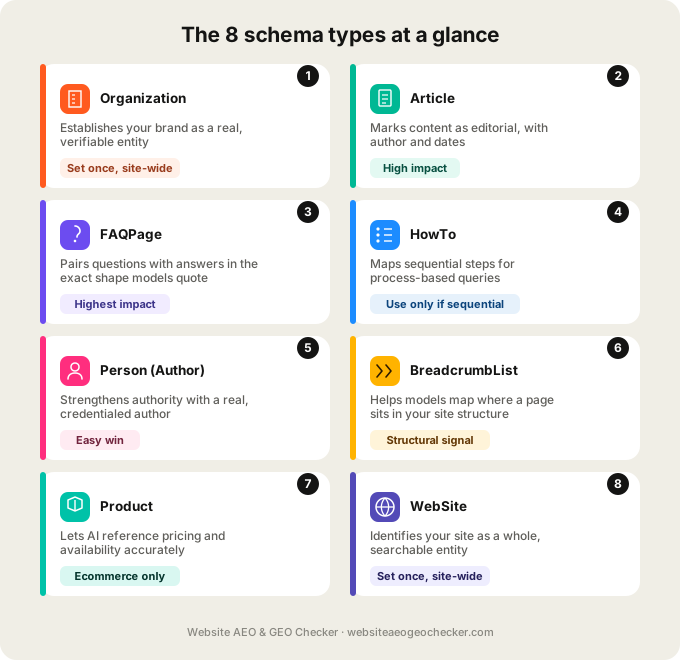
The 8 Schema Types That Help Most
These eight cover the overwhelming majority of what a typical content site, blog, or business website needs. You do not need all eight on every page. Match the type to what the page actually is.
1. Organization Schema
It shows that you exist in real life. When AI models decide whether to trust the content in your field, they check information like this. This should be put once, typically on the homepage or in a site-wide template.
<script type="application/ld+json">
{
  "@context": "https://schema.org",
  "@type": "Organization",
  "name": "Your Company Name",
  "url": "https://www.yoursite.com",
  "logo": "https://www.yoursite.com/logo.png",
  "sameAs": [
    "https://www.linkedin.com/company/yourcompany",
    "https://twitter.com/yourcompany"
  ]
}
</script>
The sameAs field matters more than it looks. It links your site to your social profiles, which helps a model confirm you are a consistent, real entity rather than an anonymous or newly created domain.
2. Article Schema
It tells models your page has structured editorial content with an author and publish date. This is one of the most AEO schema types you can use; it's the type AI systems most relate to as citable and credible written content.
<script type="application/ld+json">
{
  "@context": "https://schema.org",
  "@type": "Article",
  "headline": "Your Article Title",
  "author": {
    "@type": "Person",
    "name": "Author Name"
  },
  "datePublished": "2026-01-15",
  "dateModified": "2026-03-02",
  "publisher": {
    "@type": "Organization",
    "name": "Your Company Name",
    "logo": {
      "@type": "ImageObject",
      "url": "https://www.yoursite.com/logo.png"
    }
  },
  "image": "https://www.yoursite.com/article-image.jpg"
}
</script>
Keep dateModified current. A model weighs recency heavily on topics where facts or numbers change over time, and a stale modification date can quietly work against you even if the content itself is still accurate.
3. FAQPage Schema
This is the one schema type that is the most directly connected to AI citations because it labels content as a direct question and answer, which is the format AI systems like to pull and quote the most.
<script type="application/ld+json">
{
  "@context": "https://schema.org",
  "@type": "FAQPage",
  "mainEntity": [
    {
      "@type": "Question",
      "name": "Your question here?",
      "acceptedAnswer": {
        "@type": "Answer",
        "text": "Your direct, complete answer here."
      }
    },
    {
      "@type": "Question",
      "name": "Your second question here?",
      "acceptedAnswer": {
        "@type": "Answer",
        "text": "Your direct, complete answer here."
      }
    }
  ]
}
</script>
Write each answer so it stands on its own, without needing the rest of the page for context. A model frequently extracts just the answer text, so if it depends on a sentence three paragraphs earlier to make sense, it loses value the moment it is lifted out.
4. HowTo Schema
If your content walks someone through a process with sequential steps, HowTo schema gives a model a structured map of each step, which tends to perform well for process-based queries.
<script type="application/ld+json">
{
  "@context": "https://schema.org",
  "@type": "HowTo",
  "name": "How to Do the Thing",
  "step": [
    {
      "@type": "HowToStep",
      "name": "Step one name",
      "text": "Description of the first step."
    },
    {
      "@type": "HowToStep",
      "name": "Step two name",
      "text": "Description of the second step."
    }
  ]
}
</script>
Use this only when your content is genuinely sequential. Forcing HowTo schema onto content that is not actually a step-by-step process creates a mismatch between what the markup claims and what the page contains, which can hurt more than having no schema at all.
5. Person Schema (Author)
You can boost your authority by using a strong Article schema and a dedicated Person schema for the author. This is especially helpful if your authors have real credentials you want to highlight.
<script type="application/ld+json">
{
  "@context": "https://schema.org",
  "@type": "Person",
  "name": "Author Name",
  "jobTitle": "Job Title",
  "url": "https://www.yoursite.com/authors/author-name",
  "sameAs": [
    "https://www.linkedin.com/in/authorname"
  ],
  "worksFor": {
    "@type": "Organization",
    "name": "Your Company Name"
  }
}
</script>
This is one of the easier wins on this list. Most sites already have author bio pages and simply never marked them up, which means the information exists but is invisible to a model unless it is explicitly tagged.
6. BreadcrumbList Schema
This helps a model understand where a page sits within your site's overall structure, which feeds directly into how well an AI crawler can map your content categories and relationships between pages.
<script type="application/ld+json">
{
  "@context": "https://schema.org",
  "@type": "BreadcrumbList",
  "itemListElement": [
    {
      "@type": "ListItem",
      "position": 1,
      "name": "Home",
      "item": "https://www.yoursite.com/"
    },
    {
      "@type": "ListItem",
      "position": 2,
      "name": "Guides",
      "item": "https://www.yoursite.com/guides/"
    },
    {
      "@type": "ListItem",
      "position": 3,
      "name": "Current Page Title",
      "item": "https://www.yoursite.com/guides/current-page/"
    }
  ]
}
</script>
This pairs naturally with the crawlability work covered in our AI Crawler Checker. A site that is easy for a bot to navigate structurally is also easier for it to trust.
7. Product Schema
If you sell anything directly, Product schema is what lets an AI system understand pricing, availability, and specifications well enough to reference your product accurately in a comparison or recommendation response.
<script type="application/ld+json">
{
  "@context": "https://schema.org",
  "@type": "Product",
  "name": "Product Name",
  "description": "Short, accurate product description.",
  "offers": {
    "@type": "Offer",
    "price": "49.99",
    "priceCurrency": "USD",
    "availability": "https://schema.org/InStock"
  },
  "aggregateRating": {
    "@type": "AggregateRating",
    "ratingValue": "4.6",
    "reviewCount": "128"
  }
}
</script>
Keep your pricing and availability correct. Outdated Product schema and a price that no longer matches what is on the page are the most common reasons AI systems will stop referencing an ecommerce page. Most of the time nothing else has to change.
8. WebSite Schema (with Sitelinks Search Box)
This tells a model how your site as a whole entity. When combined with a search action schema, it lays out for a model how a search on your site would function.
<script type="application/ld+json">
{
  "@context": "https://schema.org",
  "@type": "WebSite",
  "name": "Your Site Name",
  "url": "https://www.yoursite.com",
  "potentialAction": {
    "@type": "SearchAction",
    "target": "https://www.yoursite.com/search?q={search_term_string}",
    "query-input": "required name=search_term_string"
  }
}
</script>
This one is set once at the site level rather than per page, similar to Organization schema. It is a smaller signal on its own but rounds out a complete structured data foundation when paired with the other seven.
Real example: Raj runs a recipe blog and had been writing detailed, well-tested recipes for years without much luck showing up anywhere in AI cooking answers. He added Article schema with proper author and date fields, FAQPage schema answering the common substitution and storage questions under each recipe, and a Person schema for his own author bio, which included his background as a former line cook; 6 weeks later, he started noticing his site named directly in ChatGPT responses to specific ingredient substitution questions, something that had never happened before. "My traffic didn't move much that first month, but I started showing up by name in at least three different ChatGPT answers I tested myself, which had never happened in 2 years of writing," he says.
How to Validate Your Schema Before Publishing
Adding schema with a typo or a structural error is worse than not having it at all, since broken markup can confuse a model rather than help it. Before publishing, run your code through Schema.org's official validator, which checks your JSON-LD against the formal schema and flags missing required fields or syntax errors.
Once your schema validates cleanly, run your full page through the Free AEO Checker to see how it fits into your broader AI visibility picture alongside crawlability and content structure. Schema is one part of the puzzle, not the whole thing, and checking it in isolation can miss issues that only show up when everything is evaluated together.