Website AEO and GEO Checker logoWebsite AEO and GEO Checker
WEBSITE AEO AND GEO CHECKER

AI SEO for Bloggers: 5 Things You Can Do Right Now

2026-05-19 · 13 min read · Difficulty: Beginner

AI SEO for Bloggers: 5 Things You Can Do Right Now

You have been publishing consistently for a while. Your posts rank on the first page of Google for topics you know inside out. But open ChatGPT or Perplexity and ask a question your blog answers perfectly. Another site gets quoted. Yours does not appear.

This is not a content quality problem. And it is not something that only developers can fix.

Every guide that mentions AEO and GEO thinks understanding with JSON-LD, or that you have a developer on speed dial. This one does not. Here, five steps will be included, which will only include changes to content and structure. You can edit any of these in your WordPress editor, Ghost dashboard, Substack settings, or anywhere you write. It requires ZERO code, ZERO plugins to configure, and ZERO technical knowledge.

If you want to understand why your site is invisible in AI answers before you start, our post on why your site is not showing in ChatGPT answers covers the full picture. But if you just want to fix it, start here.

Why AI Engines Skip Most Blog Content

AI engines like ChatGPT, Perplexity, and Google AI Overviews are not looking for the best-written post. They are looking for the clearest answer to a specific question.

When a user inputs a question into one of these systems, an AI model scrapes the internet to find webpages where it can find content that can be inserted into a response with minimal or no editing. Research tracking respondents who cited the outputs of AI models found that 55 percent of citations came from the top 30 percent of responses, with citation likelihood falling dramatically after the first third. If your best answer is buried after a long introduction or three paragraphs of context, it often goes unnoticed.

That is the whole problem in one sentence. Your content exists. The answer is there. The AI just cannot find it fast enough.

The five steps below fix exactly that. None of them require you to touch your site's code.

We have checked thousands of sites. The most common reason a well-written blog never appears in AI answers is a buried intro, not bad content. - Website AEO and GEO Checker

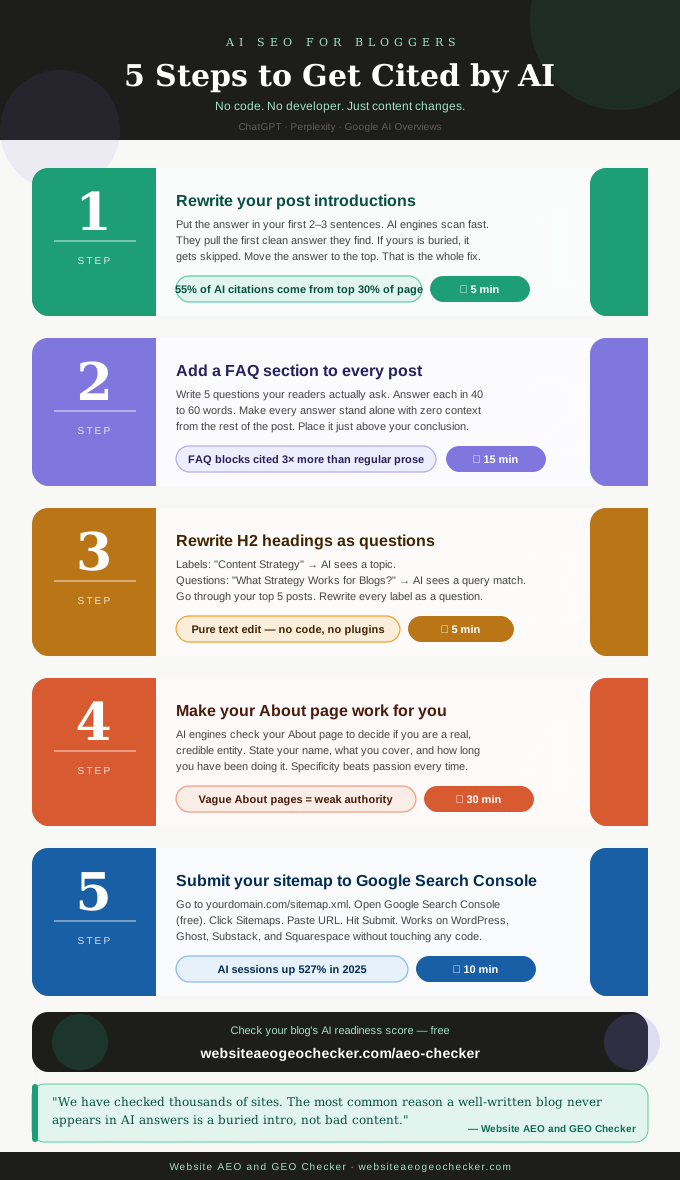
AI SEO for bloggers infographic showing 5 no-code steps to get cited by ChatGPT Perplexity and Google AI Overviews

Step 1: Rewrite Your Post Introductions

This is the single highest-impact change you can make, and it takes about five minutes per post.

Right now, most of your post introductions probably do one of a few things: bringing in context, telling a story, posing a question to the audience, or bringing an overview of the post. All of those are delaying the actual answer. AI models prefer the answer to be positioned in the first, first two to three clear sentences of a response.

This is what it looks like in practice. Assume your post is called "How to Start a Vegetable Garden." In its current state, an intro might be like so: "There is something deeply satisfying about growing your own food. Whether you have a huge backyard or a tiny balcony, there exists a vegetable garden that you can grow. In this guide, we will walk you through everything you need to know."

This is an example of a rewrite: "Choose a spot with at least six hours of direct sunlight, prepare your soil by adding compost, and start with easy crops like tomatoes, lettuce, or courgettes. Most beginners get their first seeds or seedlings in the ground within a weekend, with a budget cost of under thirty pounds."

That second version answers the question immediately. A reader who lands on just that paragraph knows what to do. An AI engine scanning the page finds a clean, quotable answer in the first 100 words.

Real example: Lucy, a food blogger with four years of recipes and guides on her site, had good Google traffic but zero AI citations despite covering popular cooking questions. She rewrote the intro paragraphs on her top 6 posts to lead with a direct two-sentence answer, including her pasta dough post, which previously opened with a two-paragraph story about her grandmother before getting to the recipe. She ran the updated posts through the Website GEO Checker to confirm the changes registered as improved answer placement. Within 5 weeks, three of those posts started appearing in Perplexity citations when users asked recipe questions.

You do not need to rewrite your whole post. Just the first paragraph. Move the answer to the top. Everything else stays.

For a deeper look at how this format works across an entire page, read our guide on how to write content for AI answer engines.

Step 2: Add a FAQ Section to Every Post

FAQ sections are one of the most reliable citation triggers in AI search, and you do not need schema markup or code to benefit from them. The content side alone makes a measurable difference.

There is a huge difference in the volume of FAQ blocks with answers of 40 to 60 words in AI responses vs. non-FAQ content. AI responds to questions. FAQ structures within a post, especially those with questions and answers, give AI exactly what it needs.

At the end of every article, list five questions that you pre-validated with the actual audience of the post. Review your post comments, visit your email (especially the questions), or check the "People Also Ask" section of Google. Search for your topic. Each response should be rated in a couple of sentences and be given in a self-sustaining manner. The responses should be able to stand on their own and provide the answer to the question.

A good FAQ answer looks like this:

Q: How often should I water a vegetable garden? A: Most vegetable gardens need about one inch of water per week, either from rainfall or irrigation. Water deeply and less frequently rather than a little every day, as this encourages roots to grow deeper into the soil. The best time to water is early morning before the heat of the day.

That answer makes sense on its own. An AI engine can pull it and use it directly. That is exactly what you want.

Place your FAQ section just above your conclusion. Five questions is the right number. Not three. Not ten. Five covers the topic without overwhelming the page.
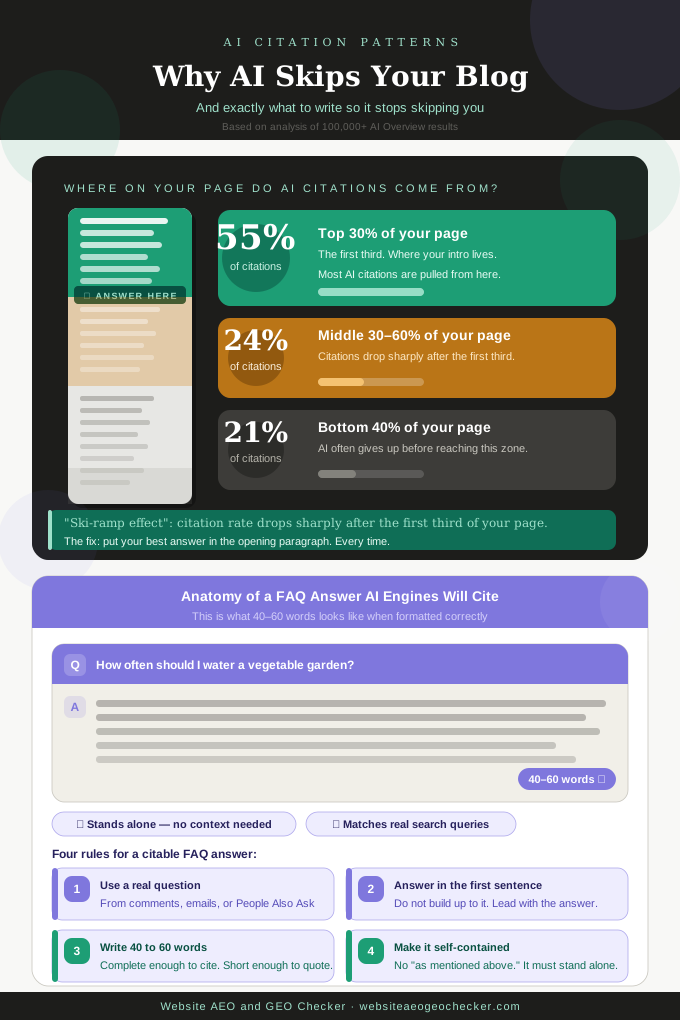
Infographic showing where AI citations come from on a page and the anatomy of a perfect FAQ answer for bloggers

Step 3: Rewrite Your H2 Headings as Questions

Your H2 headings should be the titles of each section of your post. If yours currently show as labels, as in 'Social Media Tips', 'Email Marketing Strategy', and 'Keyword Research', this step is five minutes per post and represents a clear benefit to how AI engines read your content.

AI engines map answers to questions. A heading that says "Keyword Research" gives the AI engine a label. A heading that says "How do you do Keyword Research for a Blog?" gives that engine a match. That is the difference between a heading that labels a topic and a heading that answers a question.

Go through your five highest-traffic posts. Look at every H2. Ask yourself: is this a label or a question? If it is a label, rewrite it as the question that section answers.

Here are three examples:

  • "Getting Started" becomes "How Do You Start a Food Blog From Scratch?"
  • "Tools We Use" becomes "What Tools Do Food Bloggers Actually Need?"
  • "Monetisation Tips" becomes "How Do Food Bloggers Make Money?"

Now, what is important to point out is that none of these changes involves touching any code. These changes to content are strictly changes to text in your post editor. Direct answers to questions, especially with short, clear sentences, are much more likely to be picked out of content structured as labeled topics by AI than long-form content.
Step 4: Make Your About Page Work for You

Most bloggers treat their About page as a short bio and leave it there. For AI engines, a weak About page is a weak authority signal. And authority signals are one of the things that determines whether an AI engine trusts your content enough to cite it.

Your About page should clarify who you are, what your site covers, how long you've been doing it, and why your readers should trust your advice. You do not need formal credentials. You need specificity.

"I have been writing about plant-based cooking since 2019 and have tested over 300 recipes" is more useful to an AI engine than "I am passionate about healthy eating." The first version gives the engine a clear entity, a clear subject, and a clear track record. The second gives it nothing to verify.

Check your About page right now and ask: if an AI engine read only this page, would it know what this site is about, who runs it, and why they are worth citing? If the answer is no, spend 30 minutes updating it. That is all it takes.

You can also run your site through the AI SEO Checker to see how your authority signals score alongside the other changes you are making.

A weak About page is one of the most overlooked authority gaps we find. AI engines use it to understand who you are. If it says nothing specific, you are invisible as an entity. - Website AEO and GEO Checker

Step 5: Submit Your Sitemap to Google Search Console

This is the one step with a tiny bit of setup, but it is genuinely simple and takes about ten minutes total.

A sitemap is just a file that lists all the pages on your site. Google Search Console is a free tool from Google that lets you tell Google about your site directly. Setting up Google Search Console takes about two minutes if you have not done it already. Once you are in, submitting your sitemap takes one more minute.

Why does this matter for AI visibility? AI tools like ChatGPT and Perplexity have their own web crawlers. They also rely on Google for their data. Newly published content may not show up in AI responses if Google is yet to index it. By submitting your sitemap, you can ensure Google crawls your page, and your content gets indexed.

Here is where to find your sitemap on the most common platforms:

  • WordPress: yourdomain.com/sitemap.xml or yourdomain.com/sitemap_index.xml
  • Ghost: yourdomain.com/sitemap.xml
  • Squarespace: yourdomain.com/sitemap.xml
  • Substack: yourname.substack.com/sitemap.xml

Once you have the URL, go to Google Search Console, click Sitemaps in the left menu, paste your sitemap URL, and hit Submit. Done.

Between January and May of 2025, AI-referred sessions increased by 527%. This indicates that most of the engagement your site is currently missing is occurring via AI. You must first ensure that your online content is indexed to have any hope of connecting with that traffic.

Frequently Asked Questions

What is AEO and do bloggers need to care about it?

AEO stands for answer engine optimization. This is the content structure practice that provides AI-backed tools such as ChatGPT, Perplexity, and Google AI Overviews, with the ability to access and reference content directly. AEO is crucial for bloggers because AI Overviews dominate in 48% of the queries tracked by Google, which means that for the majority of the topics, responses generated by AI appear in the space that used to be occupied by the organic results of Google.

Do I need to know how to code to improve my AI search visibility?

No. You need no coding skills to implement the five changes in this guide, such as rewriting introductions, adding an FAQ section, revising headings and your About page, submitting your sitemap, and making other content and formatting changes that can be done from within your post editor. While Schema markup and other technical adjustments can enhance your site, they should not be your first priority.

How long does it take to see results after making these changes?

Most bloggers see changes in AI citation trends anywhere between four and eight weeks after implementing content format changes. The intro rewrite and FAQs see the most immediate changes, as they impact the most on what AI engines are able to extract from. Submitting a sitemap can lead to a change in indexing in as little as a few days. The changes won't show results instantly, but they are the quickest non-technical changes that can be made.

Which posts should I reformat first?

Start with your five highest-traffic posts. These five are likely to be the most relevant to AI search queries, and hence most valuable to cite. After these, focus on the posts most aimed at answering the most common or fundamental questions in your niche. These are the posts most likely to be relevant to AI search queries.

How do I check if my blog is appearing in AI answers?

The most direct method is manual: open ChatGPT, Perplexity, and Google and search the main question each of your top posts answers. Look for your domain name in the citations. Do this monthly for your top ten posts. For a broader automated check, run your site through the Free AEO and GEO Checker to see how your pages score across the signals that determine AI citation eligibility.

Start With Three Posts

Remember, You do not need to reformat your whole site. Start by picking your three highest-traffic posts this week. Rewrite the opening paragraph so the answer comes first. Add five FAQ questions at the bottom with short, self-contained answers. Check every H2 and rewrite the ones that read like labels. That covers the most important work.

The content you already have is good enough to get cited. It just needs to be findable.

Suggested Read:


About the Author

This guide was created by the team at Website AEO and GEO Checker. We build free tools that help website owners understand and improve their visibility in AI search engines. Every recommendation in this guide is based on patterns we have observed across thousands of website checks.

Related guides

AI search for small business owners — a complete guide to getting your business recommended by ChatGPT, Perplexity, and Google AI Overviews
2026-05-03AI Search for Small Business Owners

Learn why ChatGPT, Perplexity, and Google AI Overviews recommend some businesses over others. Includes a free 4-week action plan. Check your AI visibility free with Website AEO and GEO Checker.

The complete AEO guide — everything you need to know about answer engine optimization for AI search engines
2026-04-15The Complete AEO Guide

Learn what AEO is, how it works, and how to optimize your website for AI search engines in 2026. Check your Answer Engine Optimization score free with Website AEO and GEO Checker.

Guide to measuring AEO and GEO performance — five metrics that matter, manual citation tracking, GA4 AI referral setup, and monthly measurement routine
2026-05-01Measuring AEO and GEO Performance

Track AI search performance with 5 key metrics including Share of Model, citation decay, and GA4 AI referral setup. Monitor your AEO and GEO scores with Website AEO and GEO Checker.